Showing posts with label iPad. Show all posts

Wednesday, 2 November 2011

GarageBand for iPhone - yes please!


Apple announce GarageBand for iPhone and iPod touch......

Yes please!!!!!

Way better than playing Scrabble on the go (sorry Scrabb).

Here's what's new:
  • GarageBand 1.1 - universal app designed for iPad, iPhone, iPod touch
  • Create custom chords for SI's
  • 3/4 and 6/8 time signature support
  • Reset song key without transposing original recordings
  • Transpose songs
  • Additional quantization options for recordings (straight/triplet/swing)
  • New audio export quality settings for AAC and AIFF
  • Arpeggiatior
  • Adjustable velocity settings
  • Other enhancements incl audtomatic fade out, improved audio import options, etc
Next....... iCloud support please!!!

299 pennies at the app store.

"GarageBand for iPhone - yes please!" > read the full post

Thursday, 11 November 2010

Korg iMS-20: Transform your iPad into a complete analog synth studio


Korg has just released another virtual instrument for the iPad - the Korg iMS-20, a software recreation of the classic Korg MS-20 analog synthesizer.......

According to Korg, the Korg iMS-20 "transforms your iPad into a complete analog synth studio."

Product Highlights:

- A complete recreation of the legendary Korg MS-20 analog synth

- Built-in 16-step analog sequencer to control the sound

- Music production studio with the MS-20 mono synth, a six-part drum machine, and a mixer

- Kaoss Pad function allows intuitive performance and control

- Publish and share your iMS-20 songs online with the SoundCloud audio platform

More details on specifications here, and buy it here.


"Korg iMS-20: Transform your iPad into a complete analog synth studio" > read the full post

Thursday, 4 November 2010

Nanostudio for the iPhone


Nanostudio is a sampling, synthesis, sequencing (and according to their website, mastering) ap for the iPhone.
It's been described as "Reason for the iPhone", and that's enough to make me want to have a go (have to get Kore Audio to put it on the LSS iPad!). There's a fully featured synth, with CV patching, and the TGR-16 Trigger Pad.
Here's the full specs:
Compatible Devices
  • OS version 3.1.2 or later (tested on iOS 4)
  • iPhone 3G, 3GS, 4
  • iPod Touch 2G, 3G (mic recording possible with external accessory)
  • iPod Touch 1G (mic recording not available)
  • iPad (1/2x zoom compatibility mode)
General
  • Instruments - 4x Eden synths, TRG-16 trigger pads, 6 track sequencer, 7 input mixer with two sends
  • Insert Effects - 2 per synth (waveshaper, chorus/flanger/delay)
  • Send Effects - 2 (reverb, chorus/flanger/delay)
  • Total polyphony - 48 stereo voices
  • Buffer latency - 10ms
  • Stereo 44.1kHz floating-point signal path (only the final output is reduced to 16 bit)
  • Individually optimized for new and old hardware (chooses between VFP or NEON technology)
  • Maximum size for a single sample - 8MB (total sample memory will depend on your device)
Extra Features
  • Audio copy/paste with other compatible music apps - both Intua and Sonoma standards supported
  • Direct SoundCloud sharing straight from your device
  • Compatible with Line 6 MIDI Mobilizer accessory for MIDI input from external hardware
  • MIDI file import/export
  • Eden Synth (x4)
  • Maximum polyphony - 8 voices per synth
  • 2 anti-aliased oscillators per voice, each with 36 basic waveforms including noise
  • Oscillators can be mixed or sync/ring modulated
  • Resonant filter per voice - low pass, band pass or high pass with 12dB or 24dB slope
  • Samples can be used in place of basic waveforms
  • 4 LFO's, optional sync to note start/sequencer tempo
  • 3 ADSR Envelope generators (amp, filter and aux)
  • 2 X/Y controllers, 1 configurable control knob, pitch bend wheel and accelerometer input
  • Virtual patchbay for connecting controllers, LFO's and envelopes and other synth parameters
  • 2 insert effects per synth (waveshaper, chorus/flanger/delay)
  • 192 Global presets (shared between all projects) and 64 Project specific presets
  • TRG-16 Trigger Pads and Sampling
  • Number of trigger pads - 16
  • Maximum polyphony - 16 voices
  • Adjust volume, pan, pitch, output bus, attack, release and loop type per sample
  • Exclusive groups for use with high hats etc.
  • Three output busses, each with its own filter and send effects
  • Load/save individual samples or whole kits
  • Upload wavs or aiffs to your device using NanoSync for Mac or Windows
  • Record your own samples using the internal mic (iPhone only) or external mic (iPod Touch 2G, 3G)
  • Resample NanoStudio's main mix output
  • Crop and normalize samples on the device using NanoStudio's built in sample editor with 4 levels of undo/redo
Sequencer
  • Realtime record with undo
  • Pattern editor and song arranger
  • 6 tracks (4 Eden synths and 2 tracks dedicated to the TRG-16)
  • Record unique parts or turn them into patterns for repetitive loops (100 patterns supported)
  • Draw note and controller events such as XY pad movements, pitch bend, velocity and accelerometer
  • Editing functions include delete, merge, copy, move, note length, transpose, clean and quantize
  • Controller editing and automation
  • Time signatures 2/4 - 7/4
  • 4 levels of undo/redo on every editing operation
  • All editing operations are possible while the sequence is playing
Mastering
  • Mixer with 7 stereo inputs (4 Eden synths, 3 TRG-16 output busses), 1 stereo output and 2 stereo sends
  • 2 Simultaneous global effects sends per input (reverb, chorus/flanger/delay)
  • Stereo VU displays for all inputs and outputs
  • Offline mixdown - stereo mix, individual tracks or individual song parts
And if that's not tempting enough, have a look at this:
There's support for the Akai Synthstation on its way!

Head to the blipinteractive site for more details, or click here to go straight to iTunes.
And after you've done that, head here for a stack of free Nanostudio samples from LoopMasters!


"Nanostudio for the iPhone" > read the full post

Wednesday, 4 August 2010

iVoxel Singing Vocoder for iPhone and iPad

Here's the rather cool singing vocoder from VirSin. It comes with a stack of samples, with the ability to record your own. Instant Daft Punk vocals!

Pretty awesome, but I so wish this was available as a plug-in!


"iVoxel Singing Vocoder for iPhone and iPad" > read the full post

Thursday, 3 June 2010

Free polyphonic tuner iphone app!


TC Electronics are giving away a free polyphonic tuner app for your iPhone or iPad. Very nice....
EDIT: too late! After the first 50000 copes, they started to charge around £6. Still, I've given it a go, and it works really well.


"Free polyphonic tuner iphone app!" > read the full post

Sunday, 30 May 2010

DJ on your iPad with TouchOSC

Check out this 4-part tutorial, put together by Dubspot's Tony Grund, introducing TouchOSC as an interface for DJs.

Part 1


Well, this was just an introduction. For more detail, check out parts 2-4 of the tutorial......

Part 2


Part 3


Part 4


"DJ on your iPad with TouchOSC" > read the full post

RJ Voyager

I'd like to waste time on this.......

New iPad app lets you control and interact with reactive music. Looks like fun! Available now, in the app store.


featuring Bookashade, Fabrice Lig, Rebel Sonix and Kids on DSP.

Learn more.

"RJ Voyager" > read the full post

Friday, 28 May 2010

AC-7 Pro iPad DAW controller


Well, we've had the chance to play with the iPad and AC-7 Pro for a few hours and the conclusions are, well, mixed.......
Getting the iPad and your DAW talking to each other is a little fiddly (you need to install a couple of additional apps on the Mac - see our walkthrough with Logic), and doesn't work every time, but once you're up and running, everything starts off promisingly.
Once we were all set up, the entire LSS staff squeezed into the office to have a play, and within minutes we were seeing the potential of using the iPad and AC-7 Pro in our mixes and lectures - there were more than a few of us who went from "I don't see the point of an iPad" to "I have to have one - now!"
Eventually I managed to coax the iPad away from everyone else, as it was time to put AC-7 Pro through its paces.
When you first open up the app, it takes a little while for the fader positions to be recognised. You can give them a little nudge on the iPad, or try scrolling up and down the fader banks, and they start to behave themselves.
I'd like the option to lock onto your fader selection - once you touch a fader, it's too easy to accidentally drift to the side while looking at the DAW screen, and start moving the adjacent channel. Mixing on faders is always a more instinctive process than using a mouse, and the control is smooth and accurate.
Transport controls are reliable enough, but that's where the good news ends. Things now get buggier than an entomologist convention.
As soon as you try going beyond basic fader control, AC-7 Pro gets a little unpredictable. The channel select buttons behave erratically, and the Multifunction controls never seem to do the same thing twice. Sometimes the GView controls affect just the iPad screen, other times it also affects Logic. The Assign controls have no obvious function at all.....
I don't want to dwell on the faults with AC-7 Pro too much, as the potential for this is awesome - especially when compared to the price of a dedicated touch screen controller. I can see us using iPads in all of our studios in the future - but I'd wait a little while until Saitara iron out the wrinkles in the system.

Update
We've heard from the guys at Saitara, and they've told us about a way to get a more stable performance out of AC-7 Pro, by setting up a private network between your Mac and the iPad (see our updated setup guide). Given this a try, and it seems to help things a lot (looks like most of the problems aren't due to AC-7 Pro either - quite a few people are having issues with the iPad wireless connectivity).
With the private network setup, AC-7 Pro is a much more usable system - it pretty much behaves as a Mackie controller should do. I'd like to see a few extra features - dedicated pages for plugin and pot controls would really help make this easier to use, but at £5.99, you can't complain too much!


"AC-7 Pro iPad DAW controller" > read the full post

Thursday, 27 May 2010

Logic, an iPad and AC-7 Pro

I too was a bit of a cynic when it came to the iPad. What would I use it for? Do I really need one? Well, we've got our early iPad delivery, and I've been putting some of the audio software through its paces, starting with Saitara's AC-7 DAW controller.
There'll be a full review over the next 24 hours, but as it's a bit fiddly to get AC-7 Pro up and running with Logic, here's a getting started guide.....
Installing the ap on the iPad is as simple as ever, but once you open AC-7, you'll quickly realise there's no setup menu - everything else has to be done from the computer.

Edit: we've heard from the guys at Saitara, and they recommend setting up a private network between your Mac and the iPad. Given it a try, and it's a much more stable option. This is easy:

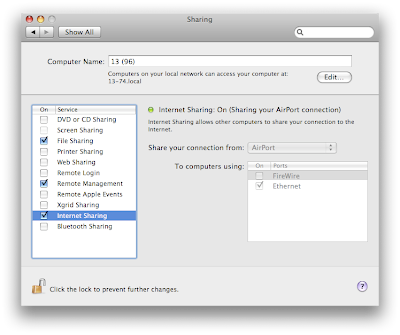
Step 1: Go to System Preferences> Sharing
Step 2: Turn on internet sharing (From Airport)

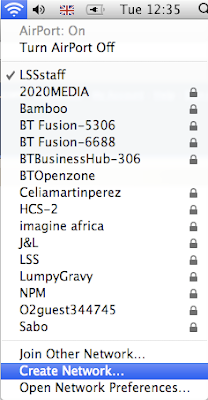
Step 3: From the Airport menu bar, create a Network

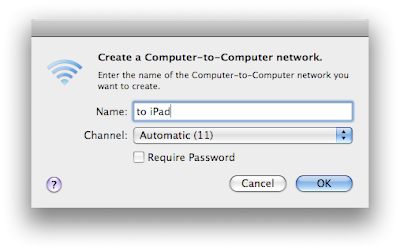
Step 4: Give the network a name

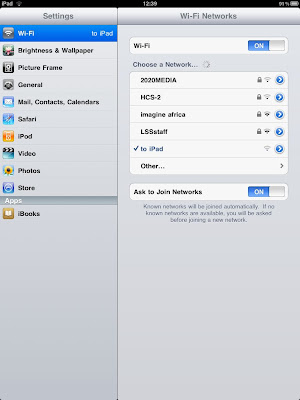
Step 5: Open the iPad WiFi settings, and choose your new network

That's it, your network is ready. OK, you won't be able to use wireless internet at the same time, but let's face it, you should be concentrating on mixing...

You'll need a couple of applications installed on the Mac, starting with DSMI Server for OSX (this is confusingly called DS MIDIwi-fi).
This allows you to send MIDI from one device to another over W--Fi, without having to set up a LAN. Once you open the ap, DS MIDIWi-fi appears as a MIDI port.

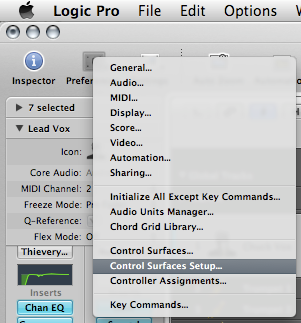
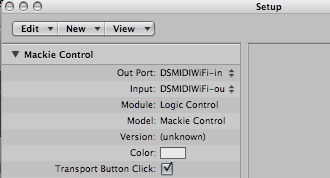
Open up Logic, and from Preferences, go to Control Surfaces Setup

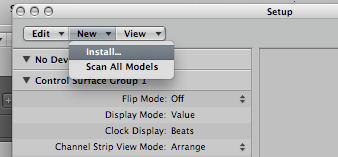
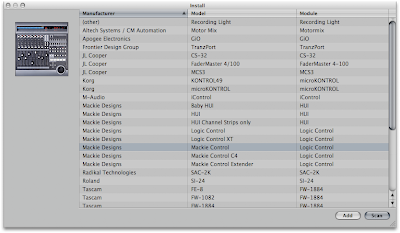
Select a New Install, and select a new Mackie Control, and press Add


Next, set the Out Port and Input to DSMIDIWiFi
Open up the AC-7 ap on your iPad, and you're up and running. It can be a bit buggy, so try moving a few faders up and down, as well as moving along banks of faders (as a good indicator, the play button on AC-7 should glow green when the sequence is playing).

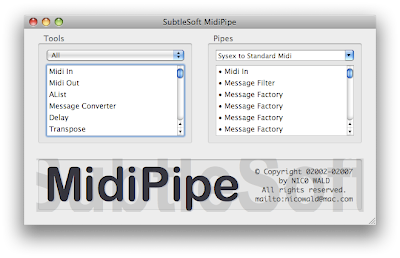
Trouble is, there is currently no way to see the Logic track names on the iPad. For this, you'll need MIDIPipe installed, and this .mpmi file (MIDIPipe setup file).
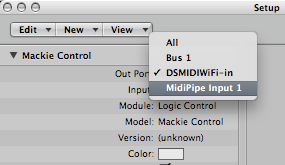
Run the AC-7 ProMC.mpmi file, and change the Out Port in the Logic Control surface setup to MidiPipe Input 1

That's it - you're up and running.
We'll do a proper review over the next couple of day, so we'll see you back here soon!


"Logic, an iPad and AC-7 Pro" > read the full post

Thursday, 13 May 2010

IK Amplitube iRig


Big fans of the IK MultiMedia stuff here, but this is a little outside their usual range.
The iRig is similar to their Amplitube software, but runs on the iPhone, iPod Touch, and of course the iPad......
But the really cool thing is the interface - an impedance matching I/O, that allows you to plug your guitar straight into the iPhone, and a headphone out. Ideal for practicing without annoying the neighbors. Up to three virtual effects pedals at a time, cab and head select, and both guitar and bass options. Expect around a £30 price tag.


"IK Amplitube iRig" > read the full post

Sunday, 2 May 2010

TouchMonome, for iPhone + iPad

TouchMonome is a Monome emulator for the iPhone and iPad on the basis of touchOSC-Monome and Nonome. TouchMonome is not available to install as an iPhone/iPad application - it still would require Max for Live and Ableton Live 8. Check out the demo......


More details are available at the Monome site.


"TouchMonome, for iPhone + iPad" > read the full post

Wednesday, 28 April 2010

Korg Monotron, most hackable synthesizer

"Good news for circuit benders. This is the most hackable synthesizer ever."

Denkitribe pairs the Korg iElectribe for the iPad with the new Korg Monotron analog synth. Check out the video.......


"Korg Monotron, most hackable synthesizer" > read the full post

Wednesday, 21 April 2010

iPad controlling Reason and Record

While still convinced that on its own the iPad has too many limitations to ever justify its place in my living room, as a host for useful apps it's already a winner and it certainly creates some interesting competition for a lot of people.

As far as we (music making geeks) are concerned it is now the best alternative to the awesome Lemur – it certainly doesn't match it, but there are practical applications where the extra latency and inferior coolness factor are not an issue.

In these two videos...

http://www.youtube.com/watch?v=vWQO0CVsS5I
http://www.youtube.com/watch?v=zg4m-hXOPmQ&NR=1

...we see the first application of an iPad as a remote control surface for Reason and Record.

In reality the interface we see is a based on an open source format so it is not exclusive to Propellerheads software, it could have been used for Live, Logic or anything else that supports some midi mapping (you will probably find many more examples on YouTube by the time I have finished typing this). And for the same reason, it's not yet the brainless solution we'd like to have, as in 'get an iPad, connect to computer, done'.

But there is little doubt that having two iPads sitting on your desk instead of a traditional mixer/controller is now a very attractive thought.
Not caring at all about 3G, we can look at the price of a couple of iPads (why two? well why not? I like living large, and have one for faders and one for something else) and see that it's still way more affordable than a traditional dedicated controller.

At the same time I also believe that touch screen have great advantages but also great disadvantages, and I will always prefer some faders and knobs that I can grab and feel.
So I won't be convinced that iPads or Lemurs are the only thing I will ever need, but a hybrid combination of both is the way to go.

In any case, expect to see one or two iPads at London School of Sound very soon. You know, for testing purposes...


"iPad controlling Reason and Record" > read the full post

Saturday, 17 April 2010

iPad USB Audio Interface, Coming Soon?


The Apple iPad could soon support USB audio interfaces, according to a posting on the Apple Core Audio API Mailing List from Apple software engineering manager William Stewart. According to Stewart, class-compliant USB audio devices will be supported through the USB dongle from the iPad camera connection kit; the iPad will support USB-Audio 1.0 class specification only, supporting full speed; iPad docks may be able to support USB audio device I/O; low-power audio interfaces will be able to run off the iPad (you may otherwise need a powered hub / device power); and the interface will support 16 bit audio (24 bit may be supported later).

At this point, USB audio support on the iPad is just a rumour - no official announcement has been made. Nevertheless a lot of people are excited about the idea. (Generally, camera accessory kits aren't a way of providing audio expansion!).

It's definitely one to watch.


"iPad USB Audio Interface, Coming Soon?" > read the full post

Saturday, 3 April 2010

Korg iElectribe - for the iPad


Korg's ELECTRIBE·R has been reborn as a dedicated iPad app - the Korg iElectribe virtual analog beatbox! The regular price is $19.99 but a special introductory price of $9.99 is being offered until June 30, 2010. Obviously, it's not equivalent in capabilities to a $300 Electribe, but it's still pretty powerful.

Check out the video.......


Here is the iTunes Store link.


"Korg iElectribe - for the iPad" > read the full post

Friday, 2 April 2010

iPad DJ app - MIXR


Mixr - the first ever professional DJ application for the iPhone and iPad. Casual and professional mixing all in one.......

The multi-touch app features cross-fading, equalizing, cue, drag and drop tracks, and full effects such as delays and auto filter.

Here is a sneak preview:


No word on a release date yet, but stay tuned for more details on the developer's site.


"iPad DJ app - MIXR" > read the full post

Thursday, 1 April 2010

iPad Music Score Application


This is the first of a series of apps which will make the iPad worth having.
While you could argue that Kindle or other eBook readers could do an even better job of displaying score sheets, the fact that on the iPad a developer can build an interface optimised for a particular use makes all the difference.

Now imagine this....


2011, New Year's concert, every member of the orchestra has a stand with an iPad to contain every piece of music they will play that night, including personal annotations, and – for good measure – a few hundred other compositions, just in case the Encore goes on for more than expected. Maybe not in 2011, but it can't be long before the players realise that it's much more fun to have an iPad to play with before the show than their Nintendo DS (they are all addicted to Brain Training)

To clarify, this software does not allow you to write score, but only to read it. This however is what most players will need to have, in a convenient interface.

The app also offers a visual metronome (clever), and the best part is that instead of using a proprietary format it is based on standard PDF files.
All you need then is to print your music as a pdf file from your favourite software (Finale, Sibelius, Logic, Cubase, they can all print score and it's easy to choose the option to 'print to PDF' from your operating system without the need for special PDF support from the music software).


http://www.forscoreapp.com/


"iPad Music Score Application" > read the full post